Open ENP architecture
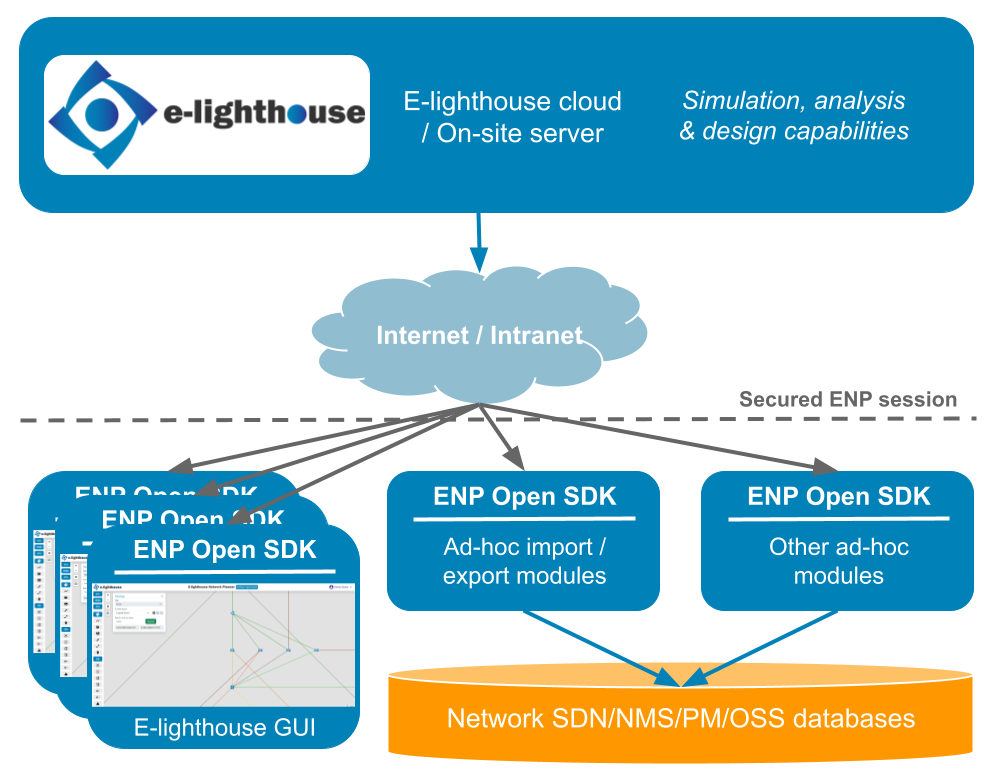
The next figure illustrates the ENP Architecture:
ENP server-side
The server-side of the ENP software is where the simulation, analysis, and design capabilities are. The ENP server for a customer deployment can be hosted either at the E-lighthouse cloud or in an on-site server hosted at the customer premises. Users start a session with its server via a secured login-password exchange to the server IP address and port (typically port 59000), which gives access to ENP capabilities. Each user has its own file system in the server to store e.g. his/her designs, IP link monitoring data files, or user preferences files. These resources are then available for the user if he/she connects from any other system. The server-side user file system is also accessible via regular SFTP access (typically port 22), using the same user credentials as the ones for opening the ENP session.
ENP Graphical User Interface (GUI)
The regular access to the ENP functionalities is via its GUI. The GUI is an application that the user can download from the ENP server, and install on one or more machines/laptops. The user running the tool is prompted for authentication. Network designs can be saved and retrieved from a client-side file system, but each user has also access to their own per-user server-side file system, so he/she can access their data when connected from other laptops.
ENP Software Development Kit (SDK)
The ENP SDK is a Java-based library that handles the interaction with the ENP server, permits building and manipulating networks in the ENP network model, and runs (in the server) the simulation, analysis, and design functionalities for them. The SDK can be downloaded from the server as an independent JAR module, to be used e.g. for developing ad-hoc applications that extend or automate customer actions in the analysis & design workflows. Examples:
- Import modules that read the network topology and configuration from the customer SDN/NMS or other databases, and automatically build an updated network view from them. Then, the ENP full power can be applied to that network, for analysis, capacity planning, and the rest of ENP use cases.
- Export modules that convert a network design produced by ENP tool during e.g. capacity planning processes, into Bill-of-Materials documents in the appropriate customer format.
- Reporting modules tuned for customer-specific needs when the built-in reports are not enough!
- Run scripts that call the ENP analysis, simulation, and design algorithms, for automating customized capacity planning tasks.
- ... and anything you need to make your life easier!
ENP Secured Session.
The communication between the user remote access and the server is handled by the Open ENP SDK, which opens an ENP session with the server. The ENP session requires user authentication via a login and password process. Then, all the communication between the client and the server sides is encrypted and protected according to the highest state-of-the-art standards.